

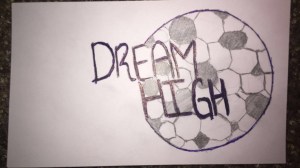
For my Draft Logo Project I decided to create a logo that illustrates an organization. My idea was to relate it to my topic of soccer and put in a title that demonstrates motivation. The reason why I decided to put the title of “Dream High” is because this organization will help individuals reach their goals or similar goals regardless of their conditions. I also decided to use the shape of a soccer ball to illustrate the organization being dedicated to the sport of soccer. I got inspired to use this type of design by the Tracing Logo Tutorial video. When I was working on the tutorial, adding circles to the design is when my inspiration came to create a soccer ball by using the Ellipse Tool and the Polygon Tool. Also, after reading the Balance, Figure and Ground assigned reading I knew I had to balance out the soccer ball shape with the wording of the title, I am not fully satisfied with balance of the title and the ball and will work on that for the final logo after receiving some feedback.
I started creating my Draft Logo by adding a circle to one of my layers with the Ellipse Tool, I did receive different sizes for the fact that I was not pressing the key “Shift” when creating the soccer ball. Also, I tried adding another layer of circle to the original circle and see if it would create a thick layer for it to look like an original ball. I did not like the result which is why I started adding weight to the stroke and using the dashed line tool to add design to the soccer ball. After adding the dashed lines, I created another layer to start using the Polygon tool. I struggled quite a bit adding Polygons to the circle because I had arrange each polygon and send it back of the circle in order for me to use the Shape Builder Tool. It did take me quite a bit to arrange it and get the results I wanted. After, I created another layer to add the Text and start using different fonts and style options, after selecting a few I enjoyed more how the rise style looked and lowered down the curve. At this point, I knew I needed to add some color because it was black and white, so I went back to the Tracing Logo tutorial to add color by using the gradient tool. Finally, I finished off by expanding the image so when I made the logo smaller, the dashed lines would keep the same size and shape.
I had a lot of fun creating the Draft Logo. I did face some struggles but solved them by going back to the tutorials and fix the problem. Some of the struggles I faced was having to undo the expand for me to be able to change the font or the size. Also, another struggle I had was having to shape the polygons on the right size inside the circle in order for it to look the same shape. I did copy and paste but I had to use the Shape Builder Tool in order to get the results I wanted. Overall, I had a great time designing the Draft Logo.





















 Brenda's Blog